systemctl命令
Linux服务(service)是Linux系统中用于执行特定任务的程序或脚本,它们通常以守护进程的方式在后台运行。
systemctl用于管理系统服务的命令行工具,它可以启动、停止、重启、启用或禁用服务,并提供有关服务状态和控制的信息。
查看服务状态
命令格式
systemctl 选项 服务名
命令详解
1、常用选项:
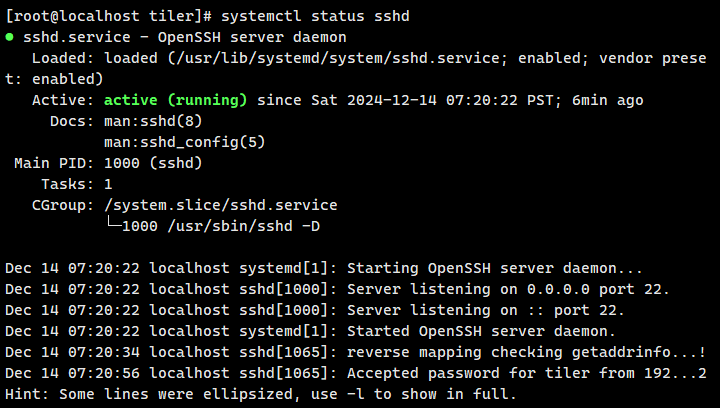
- status:查看指定服务的运行状态、日志信息和依赖关系。
- is−active:查看指定服务是否处于激活状态(运行中)。
- is−enabled:查看指定服务是否在系统启动时自动启动。
使用示例
1、systemctl status 服务名:查看指定服务的运行状态、日志信息和依赖关系。
2、systemctl is−active 服务名:查看指定服务是否处于激活状态。

3、systemctl is−enabled 服务名:查看指定服务是否在系统启动时自动启动。

管理系统服务
命令格式
systemctl 选项 服务名
命令详解
1、常用选项:
- start:启动服务。
- stop:停止服务。
- restart:重新启动服务。
- enable:设置系统启动时自动启动服务。
- disable:禁止系统启动时自动启动服务。
使用示例
1、systemctl start 服务名:启动服务。

2、systemctl stop 服务名:停止服务。

3、systemctl restart 服务名:重新启动服务。

4、systemctl enable 服务名:设置系统启动时自动启动服务。

5、systemctl disable 服务名:禁止系统启动时自动启动服务。